
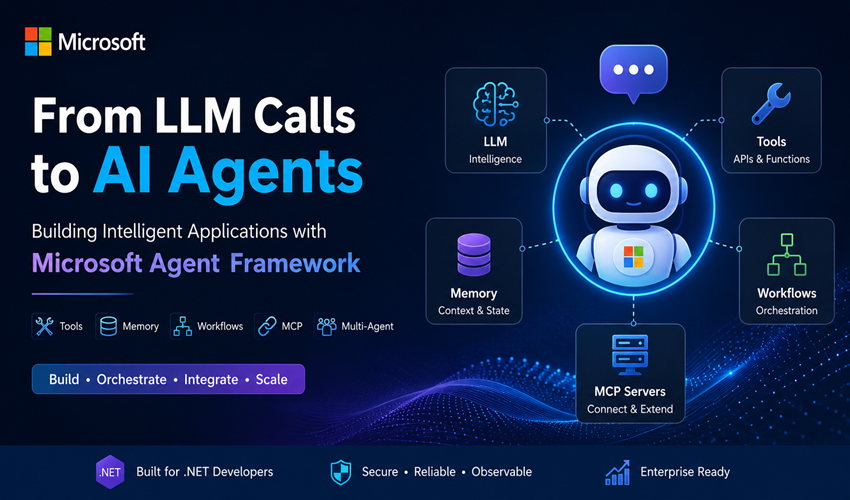
The world of AI application development is moving quickly from simple chatbots toward AI agents. A traditional AI application usually follows a straightforward pattern: send a prompt to a large language model, receive a response, and display it to the user. This works well for summarization, question answering, and content generation. However, real-world applications often need more.
An AI agent may need to understand a user’s request, decide what information it needs, call APIs, retrieve data, use tools, remember previous interactions, and complete a task across multiple steps.
That is where Microsoft Agent Framework becomes interesting. Microsoft Agent Framework is an open-source framework for building AI agents and agentic workflows. It is the successor to the concepts and work pioneered by Semantic Kernel and AutoGen, bringing together agent abstractions, enterprise capabilities such as state and telemetry, and explicit workflow orchestration. It currently supports .NET, Python, and with Go support also available.
Moving from an LLM call to an AI agent
Consider a basic LLM interaction:
User
↓
LLM
↓
Response
For a simple question, this is enough.
For example:
“What is the capital of Nepal?”
The model can answer directly:
“Kathmandu.”
But imagine a customer asking:
“My order ORD-5003 is taking too long. Can you check the status and create a support ticket if there is a problem?”
A simple LLM cannot reliably answer this because the information is not part of the model’s training data. It needs to interact with real systems.
The architecture now looks more like this:
User
↓
AI Agent
↓
Order Tool ─────→ Order API
↓
Support Tool ───→ Ticket System
↓
Final Response
The above ilustration shows the differences between simply calling an LLM and building an AI agent.
An agent wraps the model with the structure needed for a real application, such as instructions, tools, memory or context, session state, and an execution loop
What is Microsoft Agent Framework?
At its core, Microsoft Agent Framework provides a consistent way to build agents that can:
- Process user requests
- Call functions and tools
- Connect to external systems
- Maintain conversation state
- Use context and memory
- Connect with MCP servers
- Support multi-agent and multi-step workflows
- Add middleware and safety controls
- Support observability and evaluation
Microsoft groups the framework around four broad areas: Agents, Harness Agents, Workflows, and Integrations. The framework also provides building blocks for sessions, context providers, middleware, model clients, and MCP-based tool integration.
What I particularly like about this approach is that it does not force developers to build every component from scratch. You can start with a simple agent and gradually add complexity only when your application needs it.
The main components of an AI agent
A practical way to understand Microsoft Agent Framework is to think of an agent as several capabilities working together.
                   ┌───────────────┐
                   │     User      │
                   └───────┬───────┘
                           ↓
                   ┌───────────────┐
                   │   AI Agent    │
                   └───────┬───────┘
                           │
          ┌────────────────┼────────────────┐
          ↓                ↓                ↓
     Instructions        Tools        Context/Memory
          │                │                │
          └────────────────┼────────────────┘
                           ↓
                         Model
Let’s look at each part.
1. The model provides intelligence
The LLM is the intelligence behind the agent. It can understand natural language, interpret requests, reason about available information, and decide which tool might be required.
Microsoft Agent Framework supports multiple providers. Current .NET integrations include Azure OpenAI, Microsoft Foundry, OpenAI, Anthropic, Ollama, GitHub Copilot, Copilot Studio, A2A and custom agent implementations. The framework provides a common agent abstraction while allowing different providers to handle their specific capabilities.
This is important from an architecture perspective.
Instead of designing the entire application around one model provider, the agent abstraction can help separate your application logic from the underlying AI provider.
2. Instructions give the agent its role
Instructions define the behavior and responsibility of an agent.
For example, a customer support agent might have instructions such as:
You are a customer support agent.

Your responsibilities are:
- Help customers understand their orders.
- Use available tools to retrieve real information.
- Never invent order details.
- Create a support ticket when human assistance is required.
- Be concise and professional.
Instructions provide guidance, but they should not contain all business logic.
That is an important architectural distinction.
For example, you should not rely only on a prompt to enforce a rule like:
“Refund every customer whose order is delayed by three days.”
Instead, the agent can request a refund capability, while your application performs deterministic validation.
AI Agent
   ↓
Requests Refund
   ↓
Business Service
   ↓
Validate Rules
   ↓
Approve or Reject
The AI helps with understanding and decision-making. Your software remains responsible for enforcing critical business rules.
3. Tools allow the agent to act
Tools are one of the most important capabilities of an AI agent.
Without tools, the agent is limited to the information available in the model and the context you provide.
With tools, it can interact with the real world.
For example:
[Description("Gets order information by order ID.")]
public Order? GetOrder(string orderId)
{
    return _orderService.GetOrder(orderId);
}
The agent can decide:
“I need order information.”
It can then invoke the appropriate function. The execution flow becomes:
User Request
      ↓
AI Agent
      ↓
Model decides to call GetOrder()
      ↓
Application executes the tool
      ↓
Order information returned
      ↓
AI Agent generates final response
Microsoft Agent Framework supports multiple types of tools, including function tools, code execution, file search, web search, and MCP-based tools.
This is a powerful architectural model because the LLM does not need direct access to everything.
You can expose only the capabilities that you want the agent to use.
4. Function tools for existing .NET applications
One of the easiest ways to start is to expose existing application functionality as tools.
Imagine an existing application already has services such as:
CustomerService
OrderService
PaymentService
SupportService
You do not need to rebuild those systems as AI agents.
Instead:
                    AI Agent
                       │
       ┌───────────────┼────────────────┐
       ↓               ↓                ↓
Customer Tool      Order Tool      Support Tool
       ↓               ↓                ↓
Customer API       Order API       Ticket API
This is an important point for enterprise development. AI agents should usually build on top of existing software architecture, not replace it.
Your existing APIs, domain services, authentication systems, databases, and business rules can remain in place.
The agent becomes an intelligent orchestration layer.
5. Conversations and sessions
Real users do not communicate with an agent through a single request.
Consider this conversation:
User:
What is the status of order ORD-5003?

Agent:
The order is currently processing.

User:
How much did I pay?

Agent:
The order total is $79.99.
In the second request, the user does not repeat the order number.
The agent needs to understand that “I” and “the order” refer to the previous conversation.
This is where session state becomes important.
Microsoft Agent Framework includes session-based conversation management and context capabilities so agents can maintain multi-turn interactions and incorporate dynamic or persistent information.
6. Context and memory
An agent becomes more useful when it has the right context.
Context might include:
- Previous conversation messages
- Customer information
- User preferences
- Enterprise knowledge
- Retrieved documents
- Application state
However, context should not simply mean sending everything to the model.
A good architecture provides only the information needed for the current task.
For example:
User
  ↓
AI Agent
  ↓
Context Provider
  ↓
Relevant Customer Information
  ↓
LLM
This can reduce unnecessary context usage and help the agent focus on relevant information. Microsoft’s framework uses context providers as a way to inject memory and dynamic information into an agent’s context.
7. Middleware for cross-cutting concerns
Enterprise applications often need logic that applies across many operations.
Examples include:
- Logging
- Authentication
- Guardrails
- Caching
- Request transformation
- Error handling
- Auditing
In traditional applications, we often use middleware or pipeline patterns for these concerns.
The same concept is useful for AI agents.
Conceptually:
Request
   ↓
Logging Middleware
   ↓
Security Middleware
   ↓
AI Agent
   ↓
Tool Execution
   ↓
Response
Agent Framework includes middleware concepts for intercepting and customizing behavior across the agent execution pipeline. This helps avoid placing logging and governance code inside every tool or agent.
8. Model Context Protocol (MCP)
MCP is becoming an important integration pattern for AI agents.
Instead of writing every tool directly inside your agent application, an agent can connect to MCP servers that expose tools and resources.
For example:
                   AI Agent
                       │
                       ▼
                   MCP Client
                       │
         ┌─────────────┼─────────────┐
         ▼             ▼             ▼
    Order MCP      GitHub MCP    Database MCP
     Server          Server        Server
Microsoft Agent Framework supports MCP clients and both local and hosted MCP tool scenarios.
For enterprise applications, MCP can help separate reusable tool capabilities from individual agents.
9. Agents and workflows
Agents and workflows are not the same thing. One mistake developers can make is to use an AI agent for every problem.
Microsoft’s guidance makes an important distinction.
Use an agent when:
- The task is open-ended or conversational
- The system needs reasoning
- The model needs to choose tools
- The execution path is dynamic
Use a workflow when:
- Steps are well-defined
- Execution order is explicit
- Deterministic coordination is important
- Multiple steps or agents need structured orchestration
For example:
Customer Request
       ↓
      Agent
       ↓
Classify Request
       ↓
    Workflow
       ↓
Validate → Process → Notify
A useful principle is:
If you can solve the task with a deterministic function, workflow, or normal application logic, you may not need an AI agent for that part.
Microsoft Agent Framework explicitly distinguishes agents from workflows and provides graph-based workflows for controlled orchestration.
10. Building a multi-agent system
Sometimes one agent is enough. For example, a small customer support agent may have access to several tools. However, as responsibilities grow, specialized agents can make sense.
                    User
                      │
                      ▼
              Orchestrator Agent
                      │
        ┌─────────────┼─────────────┐
        ↓             ↓             ↓
   Order Agent   Support Agent   Billing Agent
        │             │             │
        ▼             ▼             ▼
    Order API      Ticket API    Payment API
The important thing is not to create multiple agents simply because multi-agent systems are popular and easy to create. Every agent should have a clear responsibility.
The Agent Framework supports composing agents, including patterns where one agent can be used as a capability of another, while workflows provide explicit coordination for multi-step and multi-agent processes.
A simple Customer Support Agent architecture
Let’s put these concepts together.
Suppose we are building a Customer Support Agent using .NET.
                         User
                           │
                           ▼
                    ASP.NET Core API
                           │
                           ▼
                 Customer Support Agent
                           │
          ┌────────────────┼────────────────┐
          ▼                ▼                ▼
    Customer Tool     Order Tool      Support Tool
          │                │                │
          ▼                ▼                ▼
    Customer API       Order API       Ticket System
A user might ask:
“My order ORD-5003 has been processing for too long. Can you check it and create a support ticket?”
The agent could follow this flow:
1. Understand the user request
            ↓
2. Determine that order information is required
            ↓
3. Call GetOrder("ORD-5003")
            ↓
4. Analyze the returned information
            ↓
5. Determine that a support ticket may be required
            ↓
6. Call CreateSupportTicket(...)
            ↓
7. Generate a natural-language response
The important part is that the agent does not directly manipulate the database.
The tools and application services remain responsible for executing controlled business operations.
A simple conceptual .NET example
A basic agent can be created around a chat client:
using Microsoft.Agents.AI;
using Microsoft.Extensions.AI;

AIAgent agent = new ChatClientAgent(
    chatClient,
    instructions:
        "You are a helpful customer support assistant.");
From there, the agent can be extended with tools, sessions, context providers, middleware, and workflows depending on the application’s needs. Microsoft documents AIAgent as the common .NET abstraction across application-owned and remote agent types.
The architecture should evolve gradually:
Stage 1
User → LLM

Stage 2
User → Agent → LLM

Stage 3
User → Agent → Tools → APIs

Stage 4
User → Agent → Tools + Context + Memory

Stage 5
Agent → Workflow → Multiple Agents + Human Approval
There is no need to start at Stage 5. Start with the simplest architecture that solves the actual problem.
Code sample of Customer Support Agent is available here.
Why Microsoft Agent Framework is interesting for .NET developers
For .NET developers, the framework fits naturally with existing application architecture. You can use familiar concepts such as:
- Dependency Injection
- Strongly typed C# code
- Functions and services
- Middleware
- APIs
- Logging
- OpenTelemetry
- Background processing
- Existing domain and application layers
The AI model becomes another important component in your application architecture.
Instead of building an isolated chatbot, you can integrate intelligent capabilities with existing .NET services and enterprise systems. Microsoft positions the framework as part of the .NET AI development ecosystem and provides a guided path from a first agent through tools, conversations, memory, persistence, and workflows.
Conclusion
Microsoft Agent Framework provides a structured way to move beyond simple LLM calls and build capable AI agents using tools, context, memory, workflows, and external systems. For .NET developers, it offers familiar development patterns while integrating AI with existing applications.
The key is to start simple and add capabilities as needed. AI agents should not replace traditional software architecture instead, they should work alongside it. The LLM provides intelligence, while good architecture provides the security, reliability, scalability, and control needed for real-world AI applications.
Code sample for the example Customer Support Agent can be found in the git repo here.